
Download MOBZize – Free File Manager for Windows, Secure & Fast Folder Organizer
MOBZize, developed by MOBZystems, is a lightweight and intuitive file manager software designed specifically for Windows users. With its classic Explorer-style interface, MOBZize delivers a clean, efficient way to manage your files and folders. The software loads folder structures asynchronously, ensuring smooth navigation even in deeply nested directories.
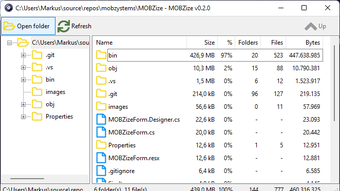
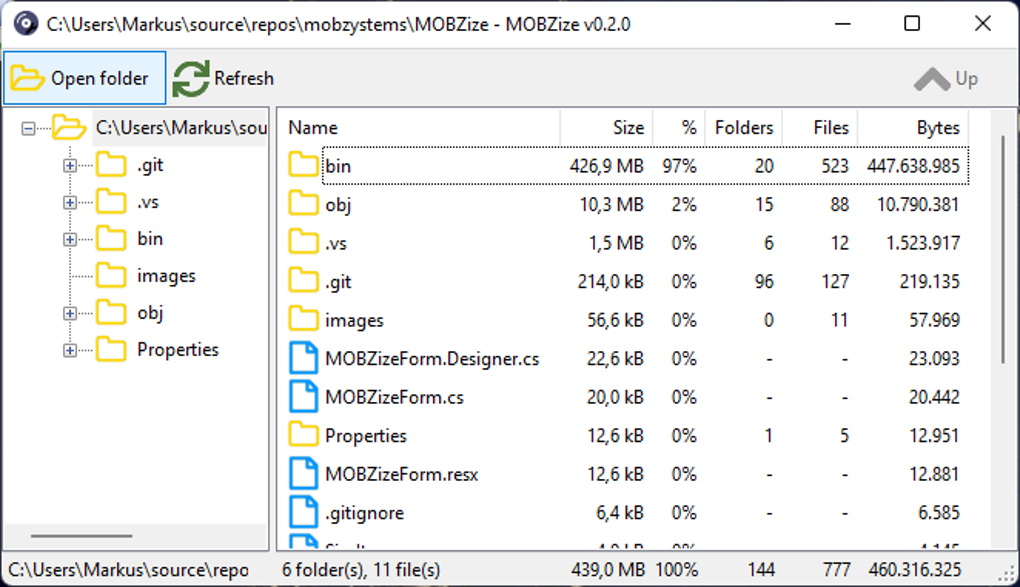
Whether you're organizing documents, managing media files, or transferring data between drives, MOBZize provides a responsive and user-friendly experience. Its familiar layout features a folder tree on the left and detailed file listings on the right, making it easy to locate and manage files without the clutter of modern UI distractions. The tool includes essential navigation buttons such as Open Folder, Refresh, and Up, allowing quick access and seamless movement through your file hierarchy.
Right-click context menus offer powerful options like Show in Explorer and Open in Explorer, enhancing workflow efficiency. MOBZize is completely free to download and use, making it an excellent alternative for users seeking a no-frills, reliable file management tool.
Intuitive Interface and Seamless Navigation
One of MOBZize’s standout features is its clean, intuitive interface that closely mimics the traditional Windows Explorer layout. This design choice ensures that users—especially those who prefer a familiar workflow—can jump right in without a learning curve. The left panel displays a collapsible folder tree, allowing you to quickly browse through your drives, network locations, and user directories. As you expand folders, MOBZize loads content asynchronously, meaning the interface remains responsive even when dealing with large or slow-access folders. This is a significant improvement over standard Explorer behavior, where the entire window can freeze during directory loading.
Navigation is further enhanced with a set of dedicated buttons: the Open Folder button lets you quickly open any directory with a single click, the Refresh button updates the file list instantly, and the Up button allows you to move up one level in the folder hierarchy—perfect for quick backtracking. These tools are seamlessly integrated into the UI, minimizing clicks and maximizing productivity. The right panel displays file details such as name, size, type, and modification date, which can be customized to show additional metadata. Right-clicking on any file or folder opens a context menu with powerful options like Show in Explorer and Open in Explorer, enabling you to leverage native Windows tools when needed.
For users who value speed and efficiency, MOBZize strikes a perfect balance between simplicity and functionality. There are no unnecessary animations or flashy effects—just a straightforward, no-nonsense file manager that gets the job done. Whether you're a casual user managing personal files or a power user handling complex project structures, the interface adapts effortlessly. The software’s minimal footprint ensures it runs smoothly on older hardware, making it ideal for legacy systems where modern file explorers may lag. Overall, the interface is not just functional—it’s thoughtfully designed to reduce friction in everyday file management tasks.
Powerful Features and Lightweight Performance
MOBZize may be simple at first glance, but it packs several powerful features that elevate its utility beyond basic file browsing. One of the most appreciated aspects is its asynchronous folder loading, which prevents the UI from freezing when accessing large directories. This is particularly beneficial when working with network drives, external storage, or deeply nested project folders where traditional file explorers often lag. By loading folder contents in the background, MOBZize maintains a fluid experience, allowing you to continue browsing while data is being fetched.
The software supports quick file operations such as copy, move, delete, and rename directly from the interface. These actions are executed with minimal delay, thanks to its lightweight architecture. MOBZize also includes a built-in search function that allows you to find files by name, type, or size with real-time results. This is especially useful when managing large collections of documents or media files. Additionally, the context menu offers advanced options like Open in Explorer, which seamlessly integrates with the native Windows environment, giving you the best of both worlds—MOBZize’s speed and Explorer’s compatibility.
Another notable feature is portability. MOBZize doesn’t require installation—just download the executable and run it. This makes it ideal for use on shared or restricted systems, such as office computers or public terminals.
You can carry it on a USB drive and use it anywhere without leaving traces. The software is also completely free and ad-free, with no in-app purchases or telemetry. This commitment to privacy and simplicity sets it apart from many modern file management tools that come with hidden data collection or subscription models.
With a small download size and minimal system resource usage, MOBZize is a secure, fast, and reliable alternative for anyone looking to streamline their file management workflow.
Compatibility, Installation, and Usage
MOBZize is designed exclusively for Windows operating systems, supporting Windows 7, 8, 10, and 11. It runs on both 32-bit and 64-bit architectures, ensuring broad compatibility across older and newer machines. Because it’s a portable application, there’s no need for a traditional installation process. Simply visit the official MOBZystems website, download the latest version (currently available as a single .exe file), and run it directly. No admin rights are required, making it perfect for use in corporate environments or on locked-down devices.
Once launched, MOBZize automatically detects your local drives, network shares, and user folders, displaying them in the left-hand tree view. You can navigate by clicking on any folder, use the Up button to go back, or use the Open Folder button to browse to a specific path. The Refresh button updates the file list instantly, which is helpful after external changes or when working with dynamic content. For power users, MOBZize supports keyboard shortcuts—such as Ctrl+O to open a folder, F5 to refresh, and Backspace to go up—further boosting efficiency.
File management is straightforward: select a file or folder, right-click for context options, or use the toolbar buttons. You can copy, move, delete, or rename files with a few clicks. The search bar at the top allows you to filter files by name, type, or size.
When you’re done, simply close the application—no cleanup needed. Since MOBZize doesn’t modify the registry or install background services, it leaves no trace behind, making it a secure and hassle-free tool. Whether you're organizing your desktop, managing downloads, or transferring files between devices, MOBZize delivers a smooth and reliable experience.
Pros and Cons: A Balanced Overview
- Pros:
- Free, ad-free, and open to all users
- Lightweight and fast, even on older hardware
- Portable—no installation required
- Asynchronous folder loading for smooth navigation
- Familiar Explorer-style interface with minimal learning curve
- Supports keyboard shortcuts for advanced users
- Secure and privacy-focused—no telemetry or data collection
- Perfect for shared or restricted systems
- Cons:
- Only available for Windows (no Mac, Android, or iOS versions)
- Lacks advanced features like file preview or cloud integration
- No built-in file compression or encryption tools
- Interface is minimal—may feel too basic for some users
- Updates are manual—no auto-update feature
Frequently Asked Questions (FAQ)
Is MOBZize free to download and use?
Yes, MOBZize is completely free to download and use. There are no hidden costs, ads, or in-app purchases. The software is open to all users and does not require a license key.
Can I use MOBZize on Windows 11?
Yes, MOBZize is fully compatible with Windows 11, as well as Windows 10, 8, and 7. It runs on both 32-bit and 64-bit systems without issues.
Is MOBZize portable? Can I run it from a USB drive?
Absolutely. MOBZize is a portable application—no installation is required. You can copy the .exe file to a USB drive and run it from any Windows computer, making it ideal for temporary or shared systems.
Does MOBZize support file preview or cloud storage?
MOBZize does not include built-in file preview or cloud integration. It focuses on core file management tasks. For advanced features like previews or cloud sync, you’ll need to use external tools or native Windows features.
How do I update MOBZize?
Updates are manual. You’ll need to visit the official MOBZystems website periodically to check for new versions. There is no auto-update feature built into the software.
Conclusion: A Reliable, Free File Manager for Windows
If you're looking for a secure, fast, and lightweight file manager for Windows, MOBZize is an excellent choice. It combines the familiarity of Windows Explorer with modern performance enhancements like asynchronous loading and a clean, distraction-free interface. Its portability, zero installation requirement, and lack of ads make it ideal for both personal and professional use—especially in environments where software restrictions apply.
While it may lack some advanced features found in premium tools, MOBZize excels in simplicity, speed, and reliability. For users who value efficiency and privacy, it’s a refreshing alternative to bloated file management software. Whether you're organizing files on your desktop, managing large project folders, or working on a shared computer, MOBZize delivers a smooth and secure experience.
Download MOBZize today and experience a faster, cleaner way to manage your files—completely free and secure.







